
Set up an out-of-office note
On this page you will learn how to set up an absence note for your UNIBAS e-mail address in order to inform senders of your absence and, if necessary, to indicate a substitute.
Instruction
Open Microsoft Outlook.

Click on "File".
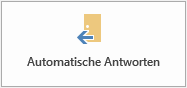
Then click on "Automatic replies".

If the end of your absence cannot be determined, do not use a time period.

If the end of your absence is known, select the appropriate time period.

Enter your absence text according to the guidelines of the respective management.
Enter the same text in the tab "Outside my organization" so that the absence note is also sent to senders outside the university.
Open "Outlook Webmail" with this URL: https://mail.unibas.ch.

Log in with your e-mail address and password.
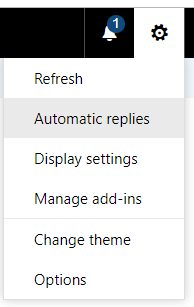
Click on the cogwheel icon in the upper right corner and select "Automatic replies".

If the end of your absence cannot be determined, do not use a time period.

If the end of your absence is known, select the appropriate time period.

Enter your absence text according to the guidelines of the respective management.
Enter the same text in the tab "Outside my organization" so that the absence note is also sent to senders outside the university.



Beratung & Hilfe
Service Desk
IT-Services
Spitalstrasse 41, 3. OG
CH-4056 Basel
Tel. +41 61 207 14 11
E-Mail support-its@unibas.ch
Schnelleinstieg für:
Schwerpunktthemen
- Two-Step Login
- Phishing
- Remote arbeiten, lehren & lernen
- Neue VPN-Lösung
Produkte & Services
KURSANGEBOTE


Anleitungen
MEHR

Sicherheit
MEHR


Quick Links
Quick Links